Create a Real-Time Chat Application with Laravel & Vue.js
In today’s digital world, real-time communication is a core feature for many platforms. By combining Laravel's robust backend with Vue’s reactive frontend, we can create a seamless chat experience.
Step 1: Database Architecture
First, we need to define our data structure. Our application relies on two primary tables: users and messages.
For the messages table, we need to track who sent the message, who received it, the content, and whether it has been read. We also included an image column to handle file attachments
// Migration for Messages
Schema::create('messages', function (Blueprint $table) {
    $table->bigIncrements('id');
    $table->foreignId('sender_id')->constrained('users');
    $table->foreignId('receiver_id')->constrained('users');
    $table->text('content');
    $table->string('image')->nullable(); // For image uploads
    $table->boolean('is_read')->default(false);
    $table->timestamps();
});
Step 2: Defining the Models
In the Message model, we define the fillable attributes and create a relationship back to the User. This allows us to easily identify the sender of any given message.
protected $fillable = ['sender_id', 'receiver_id', 'content', 'is_read', 'image'];

public function sender() {
    return $this->belongsTo(User::class, 'sender_id');
}
Step 3: The Backend Logic (ChatController)
The ChatController handles three main tasks:
Rendering the Chat: Using Inertia to serve the Vue components.
Fetching History: Retrieving a conversation between two users and automatically marking unread messages as "read."
Sending Messages: Handling both text and image uploads.
Note: For the real-time feel in this specific implementation, we use polling (fetching updates every 3 seconds), though Laravel Reverb or Pusher could be used for WebSockets.
Step 4: Building the User List
Before chatting, users need to select a contact. We use a simple UserList.vue component that displays all registered users, their profile photos, and an unread message indicator.
<Link :href="route('chat.index', user.id)" class="flex items-center hover:bg-gray-50 p-2 rounded-lg">
    <img :src="user.profile_photo_url" class="w-10 h-10 rounded-full">
    <div class="ms-4">
        <div class="text-sm font-bold">{{ user.name }}</div>
    </div>
</Link>
Step 5: Creating the Reactive Chat Interface
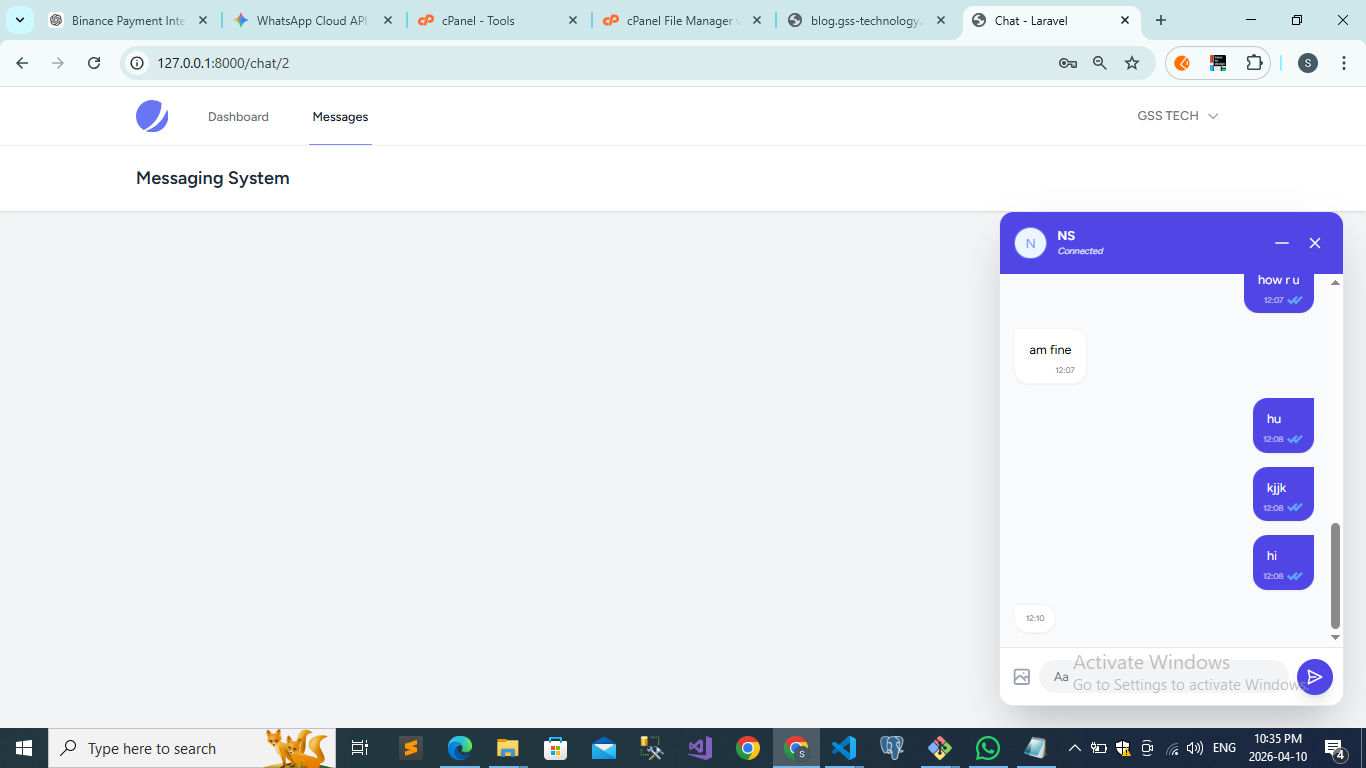
The core of the app is ChatPage.vue. It features a "Floating UI" style chat box that can be minimized or closed.
Key Features Implemented:
Auto-Scroll: Using nextTick, the chat automatically scrolls to the latest message whenever a new one arrives.
Image Uploads: A dedicated file input that allows users to send photos along with text.
Sound Notifications: A playSound() function triggers a notification chime when a new message is received from the contact.
Read Receipts: We display double-ticks (checkmarks) that turn blue when is_read is true.
const fetchMessages = async () => {
    const response = await axios.get(`/api/messages/${props.receiver.id}`);

    // Play sound if a new message arrives from the sender
    if (messages.value.length > 0 && response.data.length > messages.value.length) {
        const lastMsg = response.data[response.data.length - 1];
        if (lastMsg.sender_id === props.receiver.id) {
            playSound();
        }
    }
    messages.value = response.data;
};
Step 6: Setting up Routes
Finally, we wrap our routes in the auth:sanctum middleware to ensure only logged-in users can access the chat system.
Route::middleware(['auth:sanctum', 'verified'])->group(function () {
    Route::get('/chat/{receiver?}', [ChatController::class, 'index'])->name('chat.index');
    Route::get('/api/messages/{receiver}', [ChatController::class, 'fetchMessages']);
    Route::post('/api/messages/{receiver}', [ChatController::class, 'sendMessage']);
});
Conclusion
With this setup, you have a fully functional personal chat application. You've implemented:
✅ Secure User Authentication
✅ Real-time polling for messages
✅ Image attachments
✅ Read/Unread status indicators
✅ Audio notifications