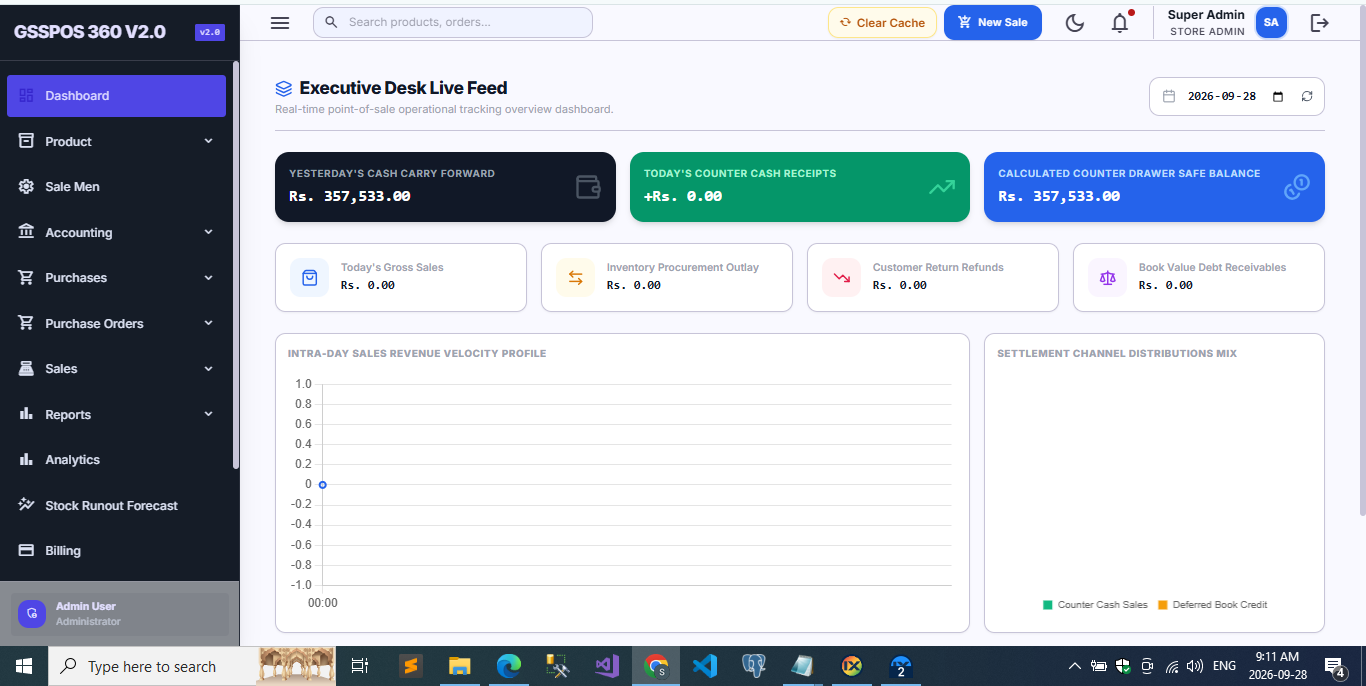
Choosing the best POS system for small businesses is one of the most important technology decisions a retailer, cafe owner, or service provider will make. A point of sale system is no longer just a cash register with a receipt printer — it is the operational hub that connects inventory, sales, purchasing, accounting, and customer relationships into a single, real-time view of the business. Whether you run a retail shop, a restaurant, a pharmacy, or a service-based business, a feature-rich POS system simplifies daily operations, improves customer service, and directly protects your profit margins. In this guide, we break down every core module a modern small business POS system should offer, explain why each one matters, and walk through what to look for before you commit to a platform.
Why Small Businesses Need a Modern POS System
Small business owners juggle dozens of moving parts every day: restocking shelves, serving customers quickly, tracking who owes what, and closing the books at month end. A legacy cash register or a spreadsheet-based workflow simply cannot keep up with modern customer expectations for fast checkout, accurate pricing, and instant receipts. A well-built POS system automates the repetitive, error-prone parts of running a business — inventory deduction, tax calculation, ledger posting — so owners can focus on growth instead of manual reconciliation. It also closes the gap between the front counter and the back office: the moment a sale happens, stock levels, customer records, and financial accounts update together, instead of being reconciled by hand days or weeks later. Below are the essential feature categories that separate a genuinely capable small business POS system from a basic checkout tool.
Key Benefits of a Feature-Rich POS System
Beyond the individual modules, a well-integrated POS system delivers a handful of business-wide benefits that directly affect the bottom line:
- Faster checkout and shorter queues, which improves customer satisfaction and increases the number of transactions staff can process per hour
- Fewer manual errors in pricing, discounts, and stock counts, since calculations and inventory deductions happen automatically
- Real-time visibility into cash flow, stock levels, and outstanding receivables, instead of waiting for a monthly close
- Lower shrinkage and internal fraud risk, thanks to role-based permissions and a full audit trail on every transaction
- Better decision-making, since owners can see which products, customers, and staff members are actually driving revenue
- Easier scaling to new branches or additional staff, because the system already enforces consistent processes and reporting
Essential Features of a POS System for Small Businesses
To streamline day-to-day operations, a comprehensive POS system should include the following core functionalities, organized by department.
1. Item Management
- Item Master Profile: store detailed information about every product, including SKU, cost price, sale price, and current stock quantity, all in one master record
- Item Search Record: locate any product instantly using an efficient search by name, SKU, or barcode, even across thousands of SKUs
- Item Category Profile: organize products into categories and sub-categories for cleaner reporting and faster browsing at the counter
- Item Unit of Measure (UOM) Profile: define how each product is sold — pieces, kilograms, packs, or cartons — and convert between units automatically at checkout
2. Service Management
- Service Profile: record and manage every service your business offers, complete with pricing, duration, and assigned staff, alongside your physical inventory
3. Vendor and Customer Management
- Vendor Profile: maintain complete supplier details, including contact information, payment terms, and purchase history
- Customer Profile: keep a centralized record of customer contact details and purchase history to support personalized service and targeted marketing
4. Invoice and Quotation Management
- Invoice Terms and Conditions Profile: standardize the terms printed on every customer invoice, ensuring consistency and legal clarity
- Quotation Terms and Conditions Profile: manage detailed terms for price quotes so customers know exactly what they're agreeing to before a sale is confirmed
5. Purchase Order Management
- Create New Order: generate purchase orders for suppliers in a few clicks, pulling item and pricing data directly from your product catalog
- Order List: maintain a complete, searchable list of every purchase order ever raised
- Search Order: locate any specific order instantly by vendor, date, or order number
- Print Order: generate print-ready or PDF copies of purchase orders to send to suppliers
6. Transaction Management
- Purchase Invoice: record supplier invoices as stock arrives, updating inventory and accounts payable automatically
- Purchase History: keep a detailed, permanent log of every purchase transaction for audit and analysis
- Purchase Filter: filter purchase records by date range, vendor, or product category to answer questions fast
- Sales Invoice: generate accurate, itemized invoices for every sales transaction, in-store or online
- Sales History: track every sale ever made, searchable by customer, date, or product
- Sales Quotation: create and manage customer quotations before converting them into confirmed sales
- Quotation History: access historical quotation data to follow up on pending deals
- Commission Management: automatically track and calculate sales commissions earned by staff on each transaction
7. Accounting Features
- Chart of Accounts: organize all financial accounts into a clean, multi-tier structure that mirrors how your business actually operates
- Income Voucher: record every incoming payment with full traceability back to the originating invoice
- Expense Voucher: log business expenses as they happen, keeping your books current instead of reconstructing them later
- Search Voucher: quickly find any specific voucher for review or correction
- Payment Collection: simplify tracking of payments collected from customers over time
- Customer Receivables and Advances History: review outstanding receivables and advance payments per customer at a glance
- Outstanding Invoice Tracking: monitor unpaid invoices proactively, before they become bad debt
8. Reporting Tools
- Purchase Reports: gain clear insight into purchasing trends over any time period
- Vendor-Wise Purchase Report: analyze total purchases broken down by individual supplier
- Vendor/Supplier Ledger: maintain a running financial ledger for each vendor relationship
- Monthly Purchase Report: summarize purchasing activity month over month for budgeting
- Stock Tracking Report: monitor inventory movement in real time across every product
- Stock Balance Report: get an instant, accurate view of exactly what's currently in stock
- Sales Reports: track daily, weekly, and monthly sales performance at a glance
- Item-Wise Sale Report: understand which specific products are driving revenue and which are underperforming
- Customer-Wise Sale Report: identify your top customers and their buying preferences
- Commission Report: review and audit commission payouts across the sales team
- Accounts Reports: generate an account ledger, collection report, expense report, profit and loss statement, balance sheet, and trial balance directly from transactional data
How to Choose the Best POS System for Your Small Business
With so many POS platforms on the market, narrowing down the right fit comes down to a few practical questions. First, does the system match how your business actually sells — retail counter sales, service appointments, or both? Second, does it integrate inventory, accounting, and reporting natively, or will you still need separate spreadsheets to reconcile the numbers? Third, can it scale with you — supporting multiple branches, multiple users with role-based permissions, and growing transaction volume without slowing down? Finally, consider total cost of ownership: licensing, hosting, support, and training all factor into whether a POS system genuinely pays for itself. A system that covers item management, transaction processing, accounting, and reporting in one connected platform will almost always outperform a patchwork of disconnected tools.
Common Mistakes to Avoid When Switching POS Systems
Even a great POS system can underperform if the transition is rushed. A few mistakes come up again and again:
- Migrating a messy product catalog — duplicate SKUs and inconsistent categories carry over and quietly break reporting later
- Skipping staff training — cashiers who don't trust the new checkout flow slow down during rush hours and revert to workarounds
- Ignoring role-based permissions — giving every user full access removes the accountability a POS system is supposed to provide
- Running the old and new systems in parallel for too long — this doubles data entry and makes reconciliation harder, not easier
- Choosing a system based on price alone, without checking whether accounting and reporting are truly built in rather than bolted on
Avoiding these pitfalls up front saves weeks of cleanup later and ensures the business sees the full benefit of the new platform from day one.
Getting Started with Your New POS System
Once you've selected a platform, a smooth rollout makes the difference between fast adoption and frustrated staff. A typical setup process looks like this:
- Prepare your environment: set up the hosting or local server environment the POS system requires, and create a fresh database for the installation
- Import your data: bring in your existing product catalog, categories, and units, cleaning up duplicates before go-live
- Configure access: set up admin and staff accounts with appropriate role-based permissions from day one
- Run a pilot: process a small batch of real transactions in a test environment before switching over fully
- Train your team: walk cashiers and managers through checkout, returns, and end-of-day reconciliation before launch day
Following this sequence — environment setup, data import, access configuration, pilot testing, and staff training — minimizes downtime and gets your team comfortable with the new system quickly.
Frequently Asked Questions
What is the best POS system for a small retail business?
The best POS system for a small retail business is one that combines item management, real-time inventory tracking, sales and purchase invoicing, and built-in accounting in a single platform. Rather than judging a system by its checkout screen alone, compare how well it handles stock control, reporting, and financial reconciliation, since those areas are where most small businesses lose time and money.
How much does a small business POS system cost?
Pricing varies widely depending on whether the system is cloud-hosted or self-hosted, how many terminals and branches are involved, and whether support and updates are included. Rather than comparing sticker price alone, factor in the time saved on manual bookkeeping and the reduction in stock discrepancies — these often outweigh the subscription or licensing cost within the first few months.
Can a POS system handle both products and services?
Yes. A well-designed POS system supports a dedicated service profile alongside standard item management, so businesses that sell both physical products and services — such as salons, repair shops, or cafes with catering add-ons — can manage everything from one platform instead of running separate tools.
Does a POS system replace an accountant?
No, but it makes an accountant's job far easier. Automated ledger postings, income and expense vouchers, and one-click profit and loss statements give your accountant clean, accurate data instead of a shoebox of receipts, which typically reduces bookkeeping time and cost significantly.
Conclusion
Investing in the right POS system can transform how a small business operates day to day. By combining item and service management, vendor and customer profiles, purchase order workflows, detailed transaction tracking, built-in accounting, and comprehensive reporting, a well-designed POS system replaces guesswork with real-time data. When evaluating your options, prioritize a platform that connects every one of these modules natively rather than bolting them together after the fact. The right choice will not just process sales faster — it will give you the financial visibility and operational control needed to scale your business with confidence. Whether you're comparing your first POS system or replacing a legacy setup that has outgrown your business, focus on the fundamentals covered in this guide: item and inventory control, purchasing, sales, accounting, and reporting, all working together in real time. Get those fundamentals right, and everything else — faster checkout, happier customers, cleaner books — follows naturally.