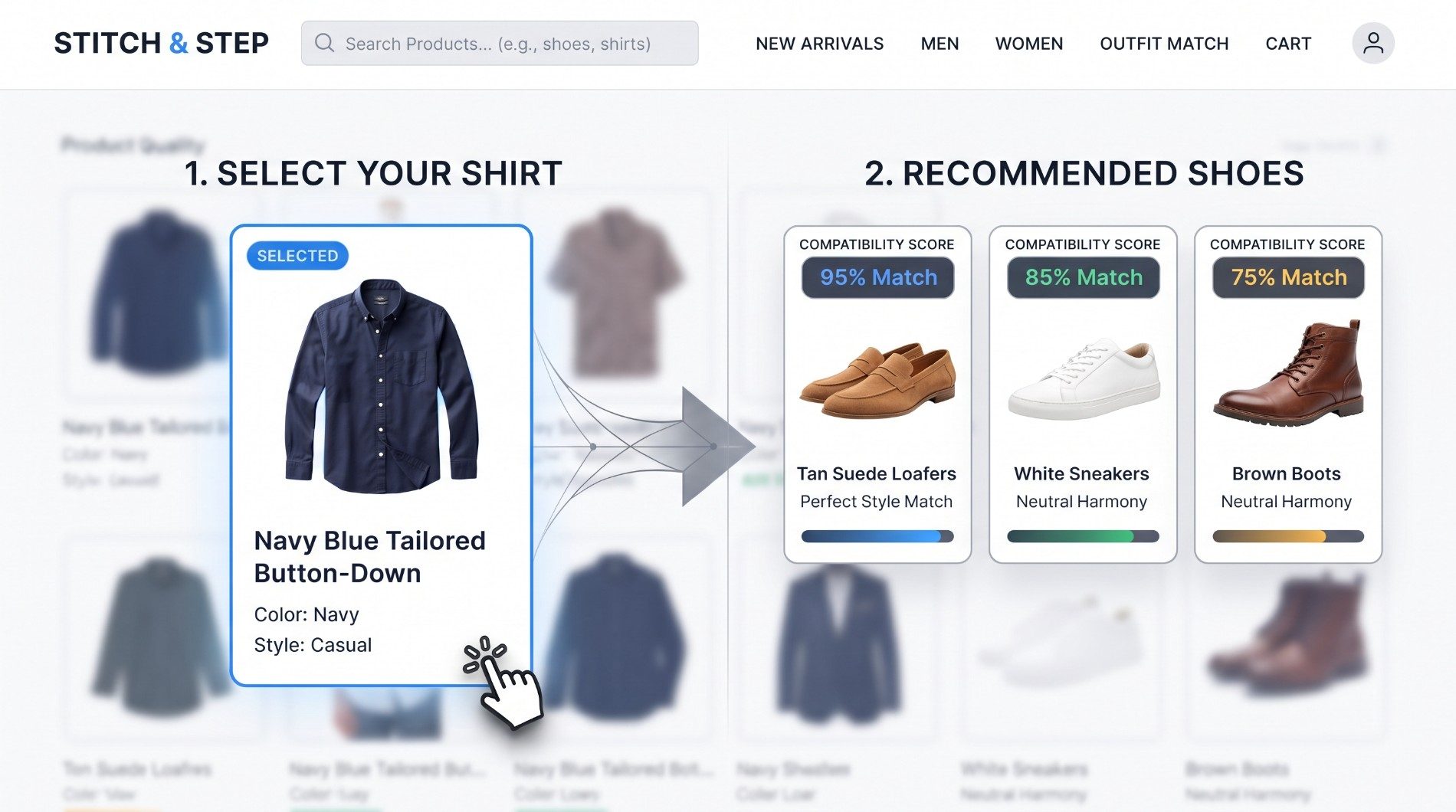
Most people dress from the top down without a second thought. They grab a crisp shirt they love, throw on whatever shoes happen to be by the door, and walk out into the world—completely unaware that a tiny clash in color, texture, or style is instantly killing their first impression. If you have ever felt like your wardrobe is packed with great individual pieces that somehow look awkward together, you are not alone. The secret to effortless personal style isn't buying more clothes; it's understanding how to bridge the gap between what you wear on your torso and what you step into. That is why building a smart, automated shoe and shirt outfit matcher can completely transform how you get dressed every single morning—and it makes for an incredible full-stack development project.
In this comprehensive, step-by-step developer guide, we are going to build a complete e-commerce utility tool from scratch. Using a robust backend powered by Laravel PHP and a lightning-fast, reactive user interface built with React.js and Tailwind CSS, you will learn how to engineer a fully functional recommendation engine that evaluates color harmony, style synergy, and seasonality to serve up perfect clothing combinations automatically.
Phase 1: Setting Up the Laravel 11 Backend API
Every great web application starts with a rock-solid data foundation. Laravel 11 provides an immaculate ecosystem for standing up RESTful APIs quickly, cleanly, and securely. Let's start by initializing our backend project and preparing our database architecture.
Step 1: Initialize Laravel Project & Configure Database
Open your terminal and run the composer command to create a new Laravel project, then navigate into your project directory:
composer create-project laravel/laravel shoe-match-api
cd shoe-match-api
Next, open your .env file in the root directory and configure your database connection credentials so Laravel can communicate with your local MySQL or MariaDB instance:
DB_CONNECTION=mysql
DB_HOST=127.0.0.1
DB_PORT=3306
DB_DATABASE=shoe_match_db
DB_USERNAME=root
DB_PASSWORD=your_password
Step 2: Create Database Migrations for Shirts and Shoes
Our application requires two primary tables to store apparel items: shirts and shoes. Each item needs specific attributes like title, category, color, hex code, style classification, seasonality, and image URLs. Run the following artisan commands to generate your migration files:
php artisan make:migration create_shirts_table
php artisan make:migration create_shoes_table
Open your newly created migration for shirts in database/migrations/{timestamp}_create_shirts_table.php and define the schema structure:
<?php

use Illuminate\Database\Migrations\Migration;
use Illuminate\Database\Schema\Blueprint;
use Illuminate\Support\Facades\Schema;

return new class extends Migration {
    public function up(): void {
        Schema::create('shirts', function (Blueprint $table) {
            $table->id();
            $table->string('title');
            $table->string('category'); // e.g., Formal Dress Shirt, Casual Button-Down
            $table->string('color');    // e.g., White, Navy, Olive
            $table->string('hex_code'); // e.g., #FFFFFF
            $table->string('style');    // casual, formal, streetwear, athletic
            $table->string('season');   // summer, winter, all-season
            $table->string('image_url');
            $table->timestamps();
        });
    }

    public function down(): void {
        Schema::dropIfExists('shirts');
    }
};
Similarly, open your shoes migration file in database/migrations/{timestamp}_create_shoes_table.php:
<?php

use Illuminate\Database\Migrations\Migration;
use Illuminate\Database\Schema\Blueprint;
use Illuminate\Support\Facades\Schema;

return new class extends Migration {
    public function up(): void {
        Schema::create('shoes', function (Blueprint $table) {
            $table->id();
            $table->string('title');
            $table->string('category'); // e.g., Oxford, Loafer, Sneaker
            $table->string('color');    // e.g., Black, Tan, White
            $table->string('hex_code'); // e.g., #000000
            $table->string('style');    // casual, formal, streetwear, athletic
            $table->string('season');   // summer, winter, all-season
            $table->string('image_url');
            $table->timestamps();
        });
    }

    public function down(): void {
        Schema::dropIfExists('shoes');
    }
};
Run your database migrations to create the tables in MySQL:
php artisan migrate
Step 3: Create Eloquent Models and Database Seeders
To make querying effortless, generate Eloquent models for both entities:
php artisan make:model Shirt
php artisan make:model Shoe
Open app/Models/Shirt.php and ensure fillable properties are set:
<?php

namespace App\Models;

use Illuminate\Database\Eloquent\Factories\HasFactory;
use Illuminate\Database\Eloquent\Model;

class Shirt extends Model {
    use HasFactory;

    protected $fillable = [
        'title', 'category', 'color', 'hex_code', 'style', 'season', 'image_url'
    ];
}
(Do the exact same for app/Models/Shoe.php). To test our matching engine right away, let's create a database seeder to populate sample apparel items:
php artisan make:seeder ApparelSeeder
Open database/seeders/ApparelSeeder.php and populate initial clothing items:
<?php

namespace Database\Seeders;

use Illuminate\Database\Seeder;
use App\Models\Shirt;
use App\Models\Shoe;

class ApparelSeeder extends Seeder {
    public function run(): void {
        Shirt::insert([
            [
                'title' => 'Crisp Oxford White Dress Shirt',
                'category' => 'Formal Dress Shirt',
                'color' => 'White',
                'hex_code' => '#FFFFFF',
                'style' => 'formal',
                'season' => 'all-season',
                'image_url' => 'https://images.unsplash.com/photo-1621072156002-e2fccdc0b176?w=600',
                'created_at' => now(), 'updated_at' => now()
            ],
            [
                'title' => 'Navy Blue Tailored Button-Down',
                'category' => 'Casual Button-Down',
                'color' => 'Navy',
                'hex_code' => '#000080',
                'style' => 'casual',
                'season' => 'all-season',
                'image_url' => 'https://images.unsplash.com/photo-1596755094514-f87e34085b2c?w=600',
                'created_at' => now(), 'updated_at' => now()
            ],
            [
                'title' => 'Olive Green Utility Overshirt',
                'category' => 'Overshirt',
                'color' => 'Olive',
                'hex_code' => '#556B2F',
                'style' => 'streetwear',
                'season' => 'winter',
                'image_url' => 'https://images.unsplash.com/photo-1578932750294-f5075e85f44a?w=600',
                'created_at' => now(), 'updated_at' => now()
            ]
        ]);

        Shoe::insert([
            [
                'title' => 'Executive Black Leather Oxfords',
                'category' => 'Oxford',
                'color' => 'Black',
                'hex_code' => '#000000',
                'style' => 'formal',
                'season' => 'all-season',
                'image_url' => 'https://images.unsplash.com/photo-1614252235316-8c857d38b5f4?w=600',
                'created_at' => now(), 'updated_at' => now()
            ],
            [
                'title' => 'Tan Suede Minimalist Loafers',
                'category' => 'Loafer',
                'color' => 'Tan',
                'hex_code' => '#D2B48C',
                'style' => 'casual',
                'season' => 'summer',
                'image_url' => 'https://images.unsplash.com/photo-1533867617858-e7d97e0cfe8b?w=600',
                'created_at' => now(), 'updated_at' => now()
            ],
            [
                'title' => 'Streetwear Chunky White Sneakers',
                'category' => 'Sneaker',
                'color' => 'White',
                'hex_code' => '#FFFFFF',
                'style' => 'streetwear',
                'season' => 'all-season',
                'image_url' => 'https://images.unsplash.com/photo-1595950653106-6c9ebd614d3a?w=600',
                'created_at' => now(), 'updated_at' => now()
            ]
        ]);
    }
}
Run the seeder command in your terminal:
php artisan db:seed --class=ApparelSeeder
Step 4: Build the Matching Algorithm Controller & API Routes
The core intelligence of our application lives inside the controller. We need an algorithm that evaluates style compatibility, color harmony, and seasonality. Create your API controller:
php artisan make:controller Api/OutfitMatcherController
Open app/Http/Controllers/Api/OutfitMatcherController.php and implement the scoring logic:
<?php

namespace App\Http\Controllers\Api;

use App\Http\Controllers\Controller;
use Illuminate\Http\Request;
use App\Models\Shirt;
use App\Models\Shoe;

class OutfitMatcherController extends Controller {

    public function getInventory() {
        return response()->json([
            'shirts' => Shirt::all(),
            'shoes' => Shoe::all(),
        ]);
    }

    public function match(Request $request) {
        $request->validate([
            'shirt_id' => 'required|exists:shirts,id'
        ]);

        $shirt = Shirt::find($request->shirt_id);
        $allShoes = Shoe::all();

        $scoredShoes = $allShoes->map(function($shoe) use ($shirt) {
            $score = 0;
            $reasons = [];

            // 1. Style Compatibility (50% Weight)
            if ($shoe->style === $shirt->style) {
                $score += 50;
                $reasons[] = "Perfect style alignment (" . ucfirst($shirt->style) . ")";
            } elseif (($shirt->style === 'casual' && $shoe->style === 'streetwear') ||
                      ($shirt->style === 'streetwear' && $shoe->style === 'casual')) {
                $score += 30;
                $reasons[] = "Complementary casual-streetwear fusion.";
            } else {
                $score += 10;
                $reasons[] = "Contrasting aesthetic pairing.";
            }

            // 2. Color Harmony (35% Weight)
            $neutrals = ['white', 'black', 'tan', 'brown', 'grey'];
            if (in_array(strtolower($shoe->color), $neutrals) || in_array(strtolower($shirt->color), $neutrals)) {
                $score += 35;
                $reasons[] = "Versatile neutral color pairing.";
            } elseif (strtolower($shirt->color) === strtolower($shoe->color)) {
                $score += 25;
                $reasons[] = "Monochromatic color scheme.";
            } else {
                $score += 15;
                $reasons[] = "Dynamic contrast color matching.";
            }

            // 3. Seasonality (15% Weight)
            if ($shoe->season === $shirt->season || $shoe->season === 'all-season' || $shirt->season === 'all-season') {
                $score += 15;
                $reasons[] = "Seasonally synchronized (" . ucfirst($shirt->season) . ").";
            }

            return [
                'shoe' => $shoe,
                'compatibility_score' => min($score, 100),
                'match_reasons' => $reasons
            ];
        });

        $sortedShoes = $scoredShoes->sortByDesc('compatibility_score')->values();

        return response()->json([
            'selected_shirt' => $shirt,
            'recommendations' => $sortedShoes
        ]);
    }
}
Expose these endpoints in routes/api.php:
use App\Http\Controllers\Api\OutfitMatcherController;

Route::get('/inventory', [OutfitMatcherController::class, 'getInventory']);
Route::post('/match-outfit', [OutfitMatcherController::class, 'match']);
Ensure CORS is enabled in config/cors.php ('allowed_origins' => ['*']), then start your Laravel development server:
php artisan serve
Phase 2: Building the React.js Frontend
With our backend API serving intelligent match recommendations, we can now create the frontend user interface.
Step 1: Initialize React Project with Vite and Tailwind CSS
In a separate terminal window, set up your React client:
npm create vite@latest shoe-match-client -- --template react
cd shoe-match-client
npm install
npm install axios lucide-react
npm install -D tailwindcss postcss autoprefixer
npx tailwindcss init -p
Configure tailwind.config.js:
/** @type {import('tailwindcss').Config} */
export default {
  content: [
    "./index.html",
    "./src/**/*.{js,ts,jsx,tsx}",
  ],
  theme: {
    extend: {},
  },
  plugins: [],
}
Add Tailwind directives to src/index.css:
@tailwind base;
@tailwind components;
@tailwind utilities;
Step 2: Create API Service & Main User Interface
Create src/services/api.js to handle Axios requests to our Laravel backend:
import axios from 'axios';

const API_BASE_URL = 'http://127.0.0.1:8000/api';

export const fetchInventory = async () => {
  const response = await axios.get(`${API_BASE_URL}/inventory`);
  return response.data;
};

export const fetchOutfitMatches = async (shirtId) => {
  const response = await axios.post(`${API_BASE_URL}/match-outfit`, {
    shirt_id: shirtId,
  });
  return response.data;
};
Now, replace src/App.jsx with the complete interactive frontend UI:
import React, { useState, useEffect } from 'react';
import { fetchInventory, fetchOutfitMatches } from './services/api';
import { Sparkles, CheckCircle, Shirt as ShirtIcon, Footprints, RefreshCw } from 'lucide-react';

export default function App() {
  const [shirts, setShirts] = useState([]);
  const [selectedShirt, setSelectedShirt] = useState(null);
  const [recommendations, setRecommendations] = useState([]);
  const [loading, setLoading] = useState(false);
  const [fetchingData, setFetchingData] = useState(true);

  useEffect(() => {
    fetchInventory()
      .then((data) => {
        setShirts(data.shirts);
        if (data.shirts.length > 0) {
          setSelectedShirt(data.shirts[0].id);
        }
        setFetchingData(false);
      })
      .catch((err) => {
        console.error("Error fetching inventory:", err);
        setFetchingData(false);
      });
  }, []);

  const handleFindMatches = async (e) => {
    e.preventDefault();
    if (!selectedShirt) return;

    setLoading(true);
    try {
      const data = await fetchOutfitMatches(selectedShirt);
      setRecommendations(data.recommendations);
    } catch (err) {
      console.error("Error getting outfit matches:", err);
    } finally {
      setLoading(false);
    }
  };

  useEffect(() => {
    if (selectedShirt && shirts.length > 0) {
      handleFindMatches({ preventDefault: () => {} });
    }
  }, [selectedShirt]);

  if (fetchingData) {
    return (
      <div className="min-h-screen bg-slate-900 flex items-center justify-center text-white">
        <RefreshCw className="w-8 h-8 animate-spin text-indigo-400 mr-3" />
        <span className="text-lg font-medium">Loading Shoe & Shirt Collection...</span>
      </div>
    );
  }

  const currentShirtObj = shirts.find(s => s.id == selectedShirt);

  return (
    <div className="min-h-screen bg-slate-950 text-slate-100 font-sans pb-16">
      <header className="border-b border-slate-800 bg-slate-900/60 backdrop-blur sticky top-0 z-50">
        <div className="max-w-7xl mx-auto px-6 py-4 flex items-center justify-between">
          <div className="flex items-center space-x-3">
            <div className="bg-indigo-600 p-2 rounded-xl text-white">
              <Sparkles className="w-6 h-6" />
            </div>
            <div>
              <h1 className="text-xl font-bold tracking-tight text-white">Stitch & Step</h1>
              <p className="text-xs text-slate-400">AI-Powered Shoe & Shirt Outfit Matcher</p>
            </div>
          </div>
          <span className="text-xs px-3 py-1 bg-indigo-500/10 text-indigo-400 border border-indigo-500/20 rounded-full font-medium">
            Laravel + React Engine
          </span>
        </div>
      </header>

      <main className="max-w-7xl mx-auto px-6 pt-10">
        <div className="grid grid-cols-1 lg:grid-cols-3 gap-8">
          <div className="lg:col-span-1 bg-slate-900/80 border border-slate-800/80 rounded-2xl p-6 shadow-xl">
            <h2 className="text-lg font-semibold text-white flex items-center mb-4">
              <ShirtIcon className="w-5 h-5 mr-2 text-indigo-400" /> Choose Your Shirt
            </h2>

            <form onSubmit={handleFindMatches} className="space-y-4">
              <div>
                <label className="block text-xs font-medium text-slate-400 mb-2 uppercase tracking-wider">
                  Available Shirts in Wardrobe
                </label>
                <select
                  value={selectedShirt || ''}
                  onChange={(e) => setSelectedShirt(e.target.value)}
                  className="w-full bg-slate-950 border border-slate-700 rounded-xl px-4 py-3 text-sm text-white focus:outline-none focus:ring-2 focus:ring-indigo-500"
                >
                  {shirts.map((shirt) => (
                    <option key={shirt.id} value={shirt.id}>
                      {shirt.title} ({shirt.color})
                    </option>
                  ))}
                </select>
              </div>

              {currentShirtObj && (
                <div className="mt-4 rounded-xl overflow-hidden bg-slate-950 border border-slate-800 p-4">
                  <img
                    src={currentShirtObj.image_url}
                    alt={currentShirtObj.title}
                    className="w-full h-48 object-cover rounded-lg mb-3"
                  />
                  <h3 className="font-semibold text-sm text-white">{currentShirtObj.title}</h3>
                  <div className="flex items-center gap-2 mt-2">
                    <span className="text-xs px-2 py-0.5 bg-slate-800 rounded text-slate-300">
                      Style: {currentShirtObj.style}
                    </span>
                    <span className="text-xs px-2 py-0.5 bg-slate-800 rounded text-slate-300">
                      Color: {currentShirtObj.color}
                    </span>
                  </div>
                </div>
              )}

              <button
                type="submit"
                disabled={loading}
                className="w-full mt-4 bg-indigo-600 hover:bg-indigo-500 text-white font-medium py-3 rounded-xl transition flex items-center justify-center space-x-2 shadow-lg shadow-indigo-600/20 disabled:opacity-50"
              >
                {loading ? (
                  <>
                    <RefreshCw className="w-5 h-5 animate-spin" />
                    <span>Matching Styles...</span>
                  </>
                ) : (
                  <>
                    <Sparkles className="w-5 h-5" />
                    <span>Find Matching Shoes</span>
                  </>
                )}
              </button>
            </form>
          </div>

          <div className="lg:col-span-2">
            <div className="flex items-center justify-between mb-6">
              <h2 className="text-xl font-bold text-white flex items-center">
                <Footprints className="w-6 h-6 mr-2 text-indigo-400" /> Recommended Shoe Pairings
              </h2>
              <span className="text-sm text-slate-400">
                Sorted by Compatibility Score
              </span>
            </div>

            {loading ? (
              <div className="grid grid-cols-1 md:grid-cols-2 gap-6">
                {[1, 2].map((n) => (
                  <div key={n} className="bg-slate-900/40 border border-slate-800/80 rounded-2xl p-6 h-80 animate-pulse"></div>
                ))}
              </div>
            ) : recommendations.length === 0 ? (
              <div className="bg-slate-900/60 border border-slate-800 rounded-2xl p-12 text-center text-slate-400">
                No matching shoes found. Select a shirt to generate recommendations.
              </div>
            ) : (
              <div className="grid grid-cols-1 md:grid-cols-2 gap-6">
                {recommendations.map((rec) => {
                  const { shoe, compatibility_score, match_reasons } = rec;
                  return (
                    <div
                      key={shoe.id}
                      className="bg-slate-900/80 border border-slate-800 rounded-2xl overflow-hidden shadow-xl flex flex-col justify-between transition hover:border-indigo-500/50"
                    >
                      <div>
                        <div className="relative h-48 overflow-hidden bg-slate-950">
                          <img
                            src={shoe.image_url}
                            alt={shoe.title}
                            className="w-full h-full object-cover"
                          />
                          <div className="absolute top-3 right-3 bg-indigo-600/90 backdrop-blur text-white text-xs font-bold px-3 py-1.5 rounded-full shadow-lg flex items-center space-x-1">
                            <Sparkles className="w-3.5 h-3.5" />
                            <span>{compatibility_score}% Match</span>
                          </div>
                        </div>

                        <div className="p-5">
                          <h3 className="font-bold text-base text-white mb-1">{shoe.title}</h3>
                          <p className="text-xs text-slate-400 mb-3">{shoe.category} • {shoe.color}</p>

                          <div className="space-y-1.5 border-t border-slate-800 pt-3">
                            {match_reasons.map((reason, idx) => (
                              <div key={idx} className="flex items-start text-xs text-slate-300">
                                <CheckCircle className="w-3.5 h-3.5 text-emerald-400 mt-0.5 mr-2 flex-shrink-0" />
                                <span>{reason}</span>
                              </div>
                            ))}
                          </div>
                        </div>
                      </div>

                      <div className="px-5 pb-5 pt-0">
                        <button className="w-full bg-slate-800 hover:bg-slate-700 text-white font-medium py-2.5 rounded-xl text-xs transition border border-slate-700">
                          Add Complete Outfit to Cart
                        </button>
                      </div>
                    </div>
                  );
                })}
              </div>
            )}
          </div>
        </div>
      </main>
    </div>
  );
}
Start your React development server:
npm run dev