ntroduction to Sales Aging Reports in Laravel
Managing accounts receivable is crucial for maintaining healthy business cash flow.
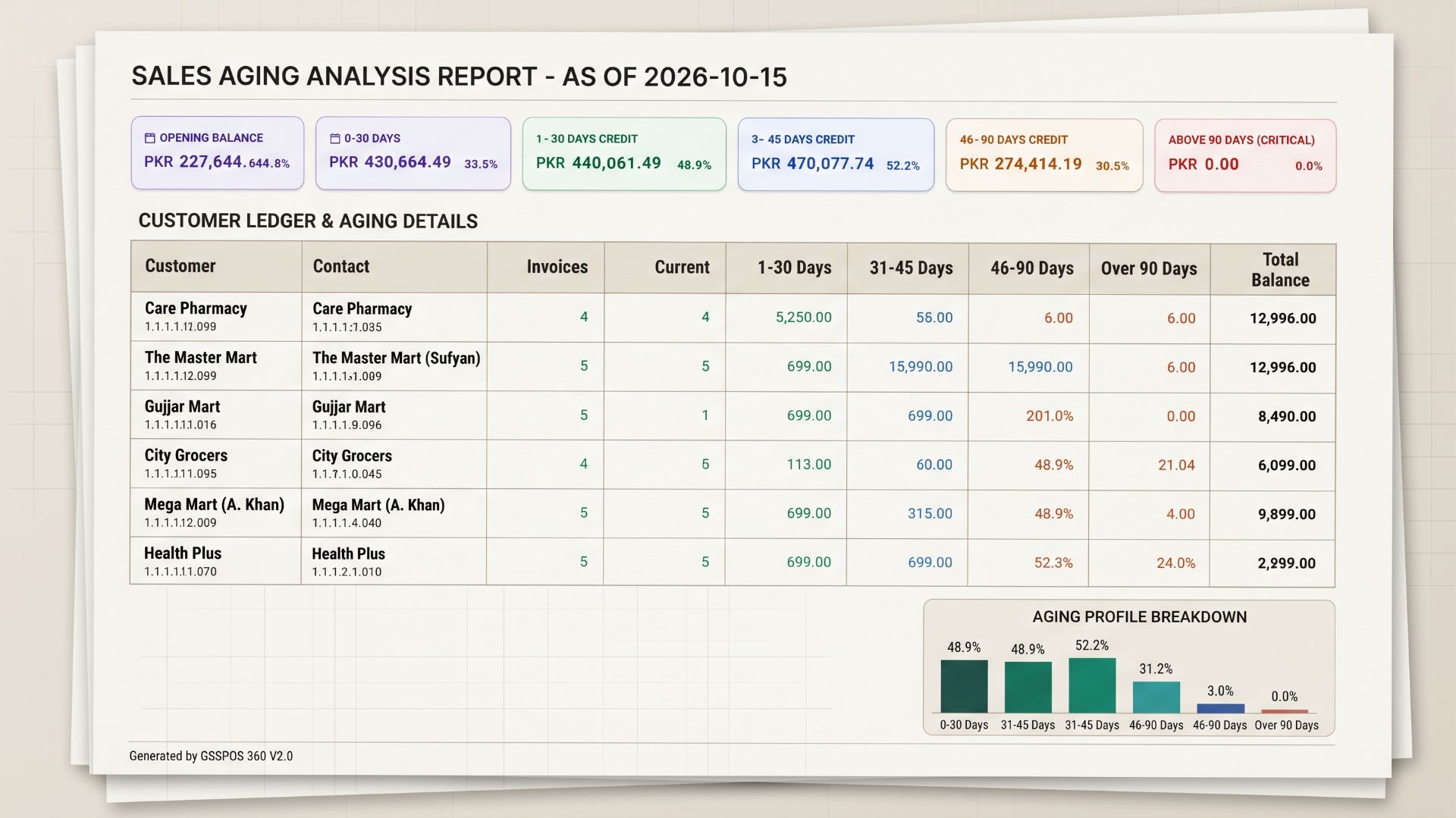
A sales aging report categorizes unpaid customer invoices by overdue dates.
Building this financial tool in Laravel requires robust database querying and date manipulation.
In this comprehensive guide, we will build a production-ready aging report controller.
Understanding the Core Architecture & Requirements
Financial modules demand precision, clear logic, and proper separation of concerns.
Our implementation relies on several key Laravel packages and Eloquent models.
Below are the primary database tables and models involved in our system:
- sales: Stores invoice headers, grand totals, paid amounts, and due balances.
- account_masters: Manages customer profiles, account types, and opening balances.
- account_transactions: Tracks payment receipts, debits, and credits.
- sale_men: Associates invoices with specific sales representatives.
Step 1: Setting Up the Controller and Base Query
Let us examine the entry point of our AgingReportController.
We begin by capturing incoming request filters like as_of_date and customer_id.
public function index(Request $request)
{
    $asOfDate = $request->query('as_of_date', Carbon::today()->format('Y-m-d'));
    $customerId = $request->query('customer_id');
    $defaultCashBookId = setting('default_cash_book');

    $minAmountRaw = $request->query('min_amount');
    $maxAmountRaw = $request->query('max_amount');

    $minAmount = ($minAmountRaw !== null && $minAmountRaw !== '') ? (float) $minAmountRaw : null;
    $maxAmount = ($maxAmountRaw !== null && $maxAmountRaw !== '') ? (float) $maxAmountRaw : null;

    $filterMode = $request->query('filter_mode', 'invoice');
    $filterMode = in_array($filterMode, ['invoice', 'customer'], true) ? $filterMode : 'invoice';
Clean input normalization prevents unexpected type casting bugs in SQL queries.
Next, we log incoming filter parameters for transparent debugging and auditing.
Step 2: Constructing the Base SQL Query with Joins
Our base query fetches confirmed sales where the due amount exceeds zero.
We utilize database joins to bring in customer details and sales representative names.
$baseQuery = DB::table('sales')
    ->join('account_masters', 'sales.customer_id', '=', 'account_masters.id')
    ->leftJoin('sale_men', 'sales.sale_men_id', '=', 'sale_men.id')
    ->where('sales.status', Sale::STATUS_CONFIRMED)
    ->where('sales.due_amount', '>', 0)
    ->whereDate('sales.sell_date', '<=', $asOfDate)
    ->where('account_masters.account_type', 'customer')
    ->where('account_masters.is_active', true);

if (!empty($defaultCashBookId)) {
    $baseQuery->where('account_masters.id', '!=', $defaultCashBookId);
}
Excluding default cash books ensures our receivables report remains accurate.
We also calculate the days overdue dynamically using database date functions.
$baseQuery->select([
    'sales.id',
    'sales.invoice_id',
    'sales.sell_date',
    'sales.grand_total_price',
    'sales.paid_amount',
    'sales.due_amount',
    'account_masters.id as customer_id',
    'account_masters.account_title as customer_name',
    'account_masters.account_code as customer_code',
    'account_masters.phone_no',
    'account_masters.contact_no',
    'account_masters.opening_balance_dr',
    'sale_men.name as salesman_name',
    DB::raw("DATEDIFF('{$asOfDate}', sales.sell_date) as days_overdue"),
]);
Step 3: Fetching Customer Cash Receipts and Credits
Receivables are directly impacted by customer payments and credit transactions.
We query the account_transactions table to sum up credits for each customer.
$receiptsQuery = DB::table('account_transactions')
    ->join('account_masters', 'account_transactions.account_master_id', '=', 'account_masters.id')
    ->where('account_masters.account_type', 'customer')
    ->where('account_masters.is_active', true)
    ->where('account_transactions.post_flag', 1)
    ->whereDate('account_transactions.voucher_date', '<=', $asOfDate);

if (!empty($defaultCashBookId)) {
    $receiptsQuery->where('account_masters.id', '!=', $defaultCashBookId);
}
if (!empty($customerId)) {
    $receiptsQuery->where('account_transactions.account_master_id', $customerId);
}

$customerReceipts = $receiptsQuery
    ->groupBy('account_transactions.account_master_id')
    ->select([
        'account_transactions.account_master_id',
        DB::raw('SUM(account_transactions.credit) as total_credit'),
        DB::raw('SUM(account_transactions.debit) as total_debit'),
    ])
    ->get()
    ->keyBy('account_master_id');
This aggregation provides the exact amount paid by each account up to our report date.
It ensures net outstanding figures reflect recent ledger settlements accurately.
Step 4: Classifying Invoices into Aging Buckets
Aging reports typically group overdue balances into 30-day interval buckets.
We map each invoice collection to classify its due amount into standard brackets.
$detailedInvoices = $invoices->map(function ($inv) use ($customerReceipts) {
    $days = (int) $inv->days_overdue;
    $due  = (float) $inv->due_amount;

    $inv->bucket_0_30    = ($days <= 30) ? $due : 0.00;
    $inv->bucket_31_45   = ($days > 30 && $days <= 45) ? $due : 0.00;
    $inv->bucket_46_90   = ($days > 45 && $days <= 90) ? $due : 0.00;
    $inv->bucket_90_plus = ($days > 90) ? $due : 0.00;

    $receipt = $customerReceipts->get($inv->customer_id);
    $inv->cash_received = $receipt ? (float) $receipt->total_credit : 0.00;

    return $inv;
});
For example, an invoice overdue by 25 days falls neatly into the 0-30 bucket.
An invoice overdue by 105 days goes straight into the 90+ bucket.
Step 5: Summarizing Customer Accounts and Net Balances
Grouping invoice rows by customer ID produces a clean account-level summary.
We factor in opening debit balances and subtract total cash receipts.
$customerSummary = $detailedInvoices->groupBy('customer_id')->map(function ($rows) use ($customerReceipts) {
    $first = $rows->first();
    $openingBalance = (float) ($first->opening_balance_dr ?? 0);

    $receipt = $customerReceipts->get($first->customer_id);
    $cashReceived = $receipt ? (float) $receipt->total_credit : 0.00;

    $invoiceDue = (float) $rows->sum('due_amount');
    $netDue = $invoiceDue + $openingBalance - $cashReceived;

    if ($netDue < 0) {
        $netDue = 0;
    }

    return [
        'customer_id'     => $first->customer_id,
        'customer_name'   => $first->customer_name,
        'customer_code'   => $first->customer_code,
        'total_due'       => $netDue,
        'bucket_0_30'     => (float) $rows->sum('bucket_0_30'),
        'bucket_31_45'    => (float) $rows->sum('bucket_31_45'),
        'bucket_46_90'    => (float) $rows->sum('bucket_46_90'),
        'bucket_90_plus'  => (float) $rows->sum('bucket_90_plus'),
    ];
})->values();
Flooring negative balances at zero prevents negative credit confusion on standard reports.
This guarantees professional financial presentation for management review.
Step 6: Handling Invoice vs. Customer Filtering Modes
Our application supports dual filter modes for precise reporting flexibility.
Users can filter by individual invoice amounts or overall customer net balances.
if ($filterMode === 'customer') {
    if ($minAmount !== null) {
        $customerSummary = $customerSummary
            ->filter(fn ($c) => (float) $c['total_due'] >= $minAmount)
            ->values();
    }
    if ($maxAmount !== null) {
        $customerSummary = $customerSummary
            ->filter(fn ($c) => (float) $c['total_due'] <= $maxAmount)
            ->values();
    }
}
This dual-mode approach satisfies both credit control managers and billing clerks.
Filtered IDs are then used to trim detailed invoice datasets accordingly.
Step 7: Exporting Reports to Printable PDFs
Enterprise software often requires high-quality PDF downloads for offline auditing.
Using barryvdh/laravel-dompdf, we generate landscape reports seamlessly.
public function printPdf(Request $request)
{
    // ... query building and aggregation logic ...

    $pdf = Pdf::loadView('pdf.print_aging_report', [
        'invoices'    => $invoices,
        'totals'      => $totals,
        'asOfDate'    => $asOfDate,
        'generatedAt' => Carbon::now()->format('d/m/Y h:i A'),
    ])->setPaper('a4', 'landscape');

    return $pdf->stream("Customer_Receivables_Aging_{$asOfDate}.pdf");
}
andscape orientation provides ample horizontal space for multiple aging columns.
Clean blade templates render tables cleanly with consistent formatting.
Conclusion and Best Practices
Building a sales aging report in Laravel combines SQL joins and collection pipelines.
Maintaining a single source of truth for calculations eliminates data discrepancies.
Always test edge cases like opening balances and credit adjustments thoroughly.
Implementing these patterns ensures your ERP software remains reliable and precise.